Hands-on Exercise
The exercise applies the full workflow to Philippines. Assume we are doing the October 2026 first round forecast.
Begin: Follow the steps below
Step 1. Update data
Run datastore_pumps.update_all to refresh the datastore (see Forcasting Flow: Update Data).
Step 2. Forecast external economies.
Use this sample external economies forecast to tune the annual GDP growth.
| Economy | GDP growth 2026 | GDP growth 2027 |
|---|---|---|
| US | 2.1 | 2.0 |
| PRC | 4.6 | 4.5 |
| Euro area | 0.8 | 1.2 |
| Japan | 0.7 | 0.8 |
United States (us) forecast
-
Open and update the
us/attributes.json -
Quick run all required steps
-
Update the GDP annual tunes
-
In the windows explorer, open
annual_tunes.csv(path = c:/CPM_Tool/us/tune_files/). -
In the
roc4_ann_gdpwcolumn, enter 1.021 (2026) and 1.020 (2027). -
Save and close the tune csv file.
-
-
Run
python -m us.simulate_forecast, to compute the forecast. -
Run
python -m us.report_forecast, to generate the charts. Review the chart, once ok, proceed to the next step. -
Run
python -m us.submit_forecast, to save the US forecast to thedatastore/data.csv.
PRC (cn) forecast
-
Open and update the
cn/attributes.json -
Quick run all required steps
-
Update the GDP annual tunes
-
In the windows explorer, open
annual_tunes.csv(path = c:/CPM_Tool/cn/tune_files/). -
In the
roc4_ann_gdpwcolumn, enter 1.046 (2026) and 1.045 (2027). -
Save and close the tune csv file.
-
-
Run
python -m cn.simulate_forecast, to compute the forecast. -
Run
python -m cn.report_forecast, to generate the charts. Review the chart, once ok, proceed to the next step. -
Run
python -m cn.submit_forecast, to save the PRC forecast to thedatastore/data.csv.
Repeat the process for euro area (ea) and Japan (jp).
Step 3. Forecast Philippines
-
Open and update the
ph/attributes.json -
This time, we will go through the nine steps. Run the commands one at a time.
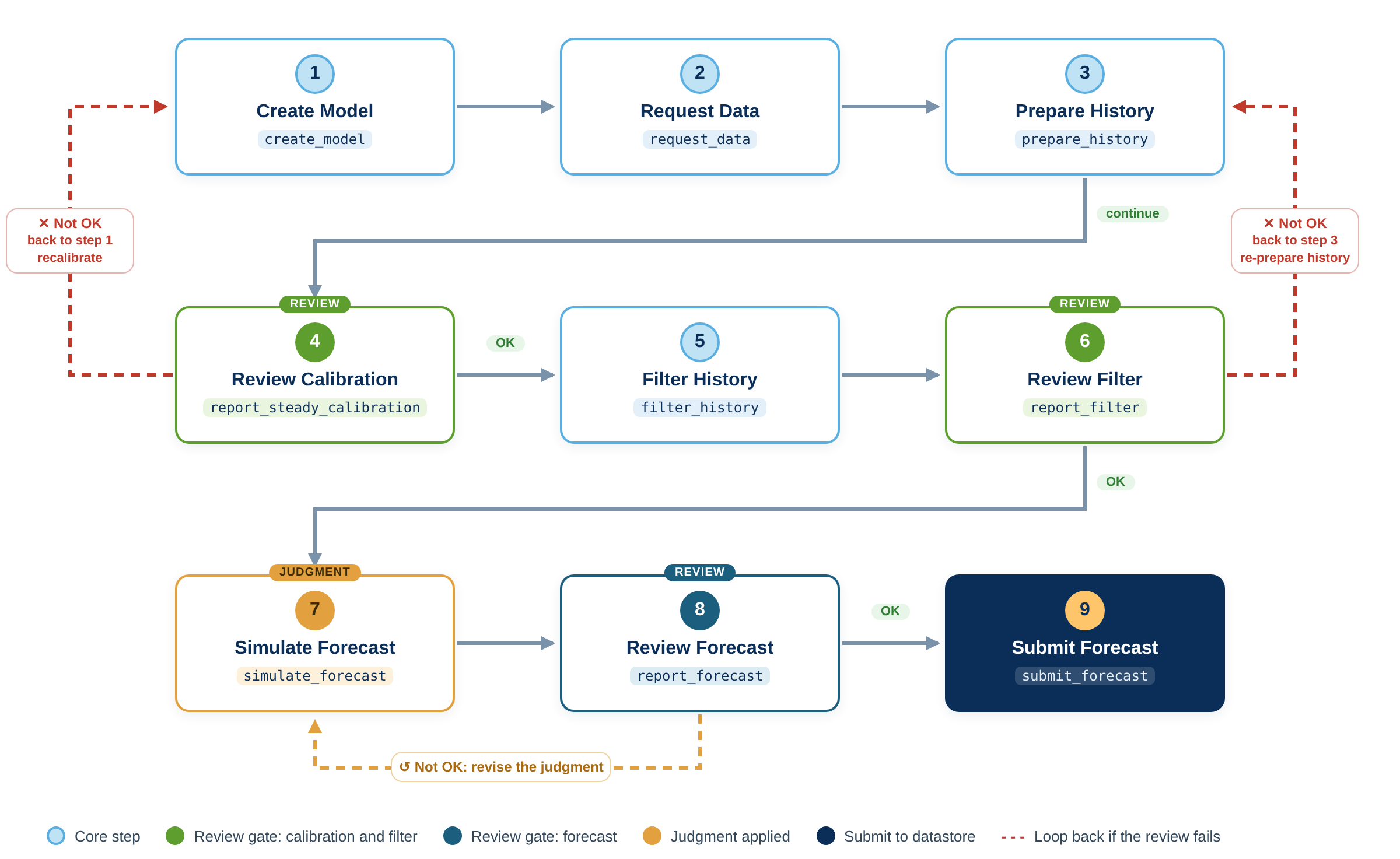
# First, configure forecast attributes in attributes.json
python -m ph.create_model
python -m ph.request_data
python -m ph.prepare_history

python -m ph.report_steady_calibration
#  review calibration, then continue

python -m ph.filter_history

python -m ph.report_filter
#  review filter results

python -m ph.simulate_forecast
#  apply judgmental adjustments

python -m ph.report_forecast
#  review forecast results, then submit

python -m ph.submit_forecast
Other focus economies
The same sequence applies to any country module — replace ph with the country code, for example in for the India.